Friday, July 30, 2021

Apple iPad Pro 12.9-inch (M1) vs Microsoft Surface Pro X: Battle of the best ARM tablet

Apple has been pretty adamant about how the iPad Pro is an excellent laptop replacement, especially the new 2021 model powered by its M1 chipset. This is the same processor Apple currently uses on the MacBook Pro 13, MacBook Air, Mac mini, and the 24-inch iMac. The latest iPad Pro offers ample storage options, lots of memory, support for 5G connectivity, and a brand new mini-LED display.

On the other side of the spectrum, we have Microsoft with the Surface Pro X, the first and only tablet from the company running on an ARM chipset made by Qualcomm and running full-fledged Windows 10.

If you’re looking for a reliable productivity tablet, there are many similarities between these two. Both offer a 13-inch display, run on ARM chipsets, and you can get them with an optional keyboard and stylus accessories. But which one is the better option?

Apple iPad Pro 12.9-inch (M1) vs. Microsoft Surface Pro X: Specifications

Apple iPad Pro 12.9-inch (M1) Microsoft Surface Pro X
CPU
  • Apple M1 chip (8-core ARM CPU, 16-core Neural Engine)
  • Microsoft SQ1 (Up to 3GHz, 8 cores)
  • Microsoft SQ2 (Up to 3.15GHz, 8 cores)
Graphics
  • 8-core GPU
  • Qualcomm Adreno 685
  • Qualcomm Adreno 690
Body
  • 280.6×214.9×6.4 mm (11.04×8.46×0.25 inches)
  • 682 g (1.50 lbs)(Wi-Fi)
  • 685 g (1.51 lbs) (5G)
  • 287×208×7.3 mm (11.3×8.2×0.28 inches)
  • 774 gms (1.7 pounds) without keyboard
Display
  • 12.9-inch Liquid Retina XDR mini-LED backlit IPS
  • 2732×2048 resolution, 120Hz ProMotion, True Tone
  • 1000 nits max full-screen brightness, 1600 nits peak brightness (HDR)
  • Supports Apple Pencil (2nd generation)
  • 13-inch PixelSense (2880×1920)
  • 267 PPI
  • 3:2 aspect ratio
  • 10 point multi-touch
Ports
  • Thunderbolt 4 with USB4 Type-C
  • 2 x USB-C
  • 1 x Surface Connect port
  • Surface Keyboard port
  • 1 x nano SIM
Storage
  • Up to 2TB
  • Up to 512GB
RAM
  • 8GB/16GB
  • Up to 16GB LPDDR4x RAM
Battery
  • 40.88Wh
  • 18W USB Type-C power delivery
  • Up to 15 hours of typical device usage
Audio
  • 5 microphones
  • Quad speakers
  • Dual far-field Studio Mics
  • 2W stereo speakers with Dolby Audio sound
Camera
  • Front: 12MP ƒ/2.4 aperture, up to 1080p HD video recording,
    Portrait mode, Lens correction, Auto image stabilization, Retina Flash, Smart HDR 3,
    FaceID
  • Rear: 12MP ƒ/1.8 aperture wide, 10MP ƒ/2.4 aperture ultra-wide,
    2x optical zoom, 5x digital zoom, up to 4K video recording, Smart HDR 3,
    Auto image stabilization, True Tone flash, Sapphire crystal
    lens cover, Lens correction (Ultra Wide)
  • 5MP front-facing camera with 1080p full HD video
  • 10MP rear-facing autofocus camera with 1080p HD and 4k video
  • Windows Hello face authentication camera (front-facing)
Connectivity
  • Wi-Fi 6
  • Bluetooth 5
  • Optional 5G
  • Wi-Fi 5: 802.11ac compatible
  • Bluetooth 5.0
  • Qualcomm Snapdragon X24 LTE model
Color
  • Silver
  • Space Gray
  • Matte Black
  • Platinum
Price
  • Starting at $799
  • Starting at $999

Design: Surface Pro X offers more ports and comes with a kickstand

The iPad Pro 2021 continues to have a similar design as last year, with a slim aluminum chassis, a square camera bump at the back, and fairly thin bezels. The Surface Pro X also comes with an aluminum finish and is quite a sleek device offering almost the same thickness (0.25 vs. 0.28 inches) as the iPad Pro and weighing only a tad bit more (682 vs. 774 grams). It has a single camera at the back which, just like the Surface Pro 7, is flushed with the main body, so there’s no camera bump. Like all Surface tablet devices, the Surface Pro X comes with a built-in kickstand allowing you to prop up the tablet on a desk without the need for an additional case or accessory.

If you keep the two tablets side by side, you’ll notice both offer different screen aspect ratios; so the iPad Pro has a taller-looking display. The iPad also has flat edges compared to the rounded-off edges on the Surface Pro X. Another thing you should know is the bezels on the Surface aren’t consistent, as the top and bottom ones are thicker, while they’re slimmer on the sides.

Surface Pro X and iPad Pro on balcony

Things get interesting when it comes to the port selection on these two tablets. The Surface Pro X offers two USB-C ports on the left and a Surface Connect port on the right. This means you get more than one connectivity option on the Surface, besides having the ability to use adapters, dongles, or even a dock. On the other hand, the iPad offers all of that bandwidth through a single USB-C port with support for Thunderbolt.

Additionally, if you go for Apple’s Magic Keyboard for the iPad Pro, an extra USB-C port is built into the spine of the keyboard case that can only be used for passthrough charging. Both tablets skip on the headphone jack, which is a huge bummer.

The Surface Pro X offers the option of upgrading the internal SSD, and while getting your hands on an M.2 2230 SSD is not that easy, it’s still better than the fixed storage options you get on the iPad.

To sum it up, both tablets offer an excellent design. The Surface Pro X is undoubtedly more practical thanks to the built-in kickstand and wider port selection, but the iPad gets all the points for being lighter, slimmer, and being a very minimalistic device.

Display: Liquid Retina XDR display on the iPad Pro is unbeatable

The display size is more or less the same on both the iPad Pro and Surface Pro X. However they come in different aspect ratios. The iPad comes with a 4:3 ratio, while the Surface has a 3:2 ratio. Neither of them feels out of place, although the iPad does look taller. Of course, the real difference is when you compare the panel itself, and that’s where the iPad Pro shines, quite literally.

Angled view of iPad Pro and Surface Pro X display

Apple is using a mini-LED-based display on the iPad Pro, specifically the 12.9-inch model. The new ‘Liquid Retina XDR’ offers 1,000 nits maximum full-screen brightness, which can go up 1,600 nits peak brightness with HDR. This makes it one of the brightest displays on a tablet today, allowing you to easily view content even under the harshest sunlight. The display also supports Apple’s ProMotion feature, which can automatically switch over to a 120Hz refresh rate for a smooth experience.

In comparison, the 13-inch display on the Surface Pro X comes with a 2880×1920 resolution meaning it offers equally good pixel density, but it’s a 60Hz panel that can only go up to 450 nits peak brightness.

Keyboard and stylus: Surface Pro X Keyboard offers better functionality
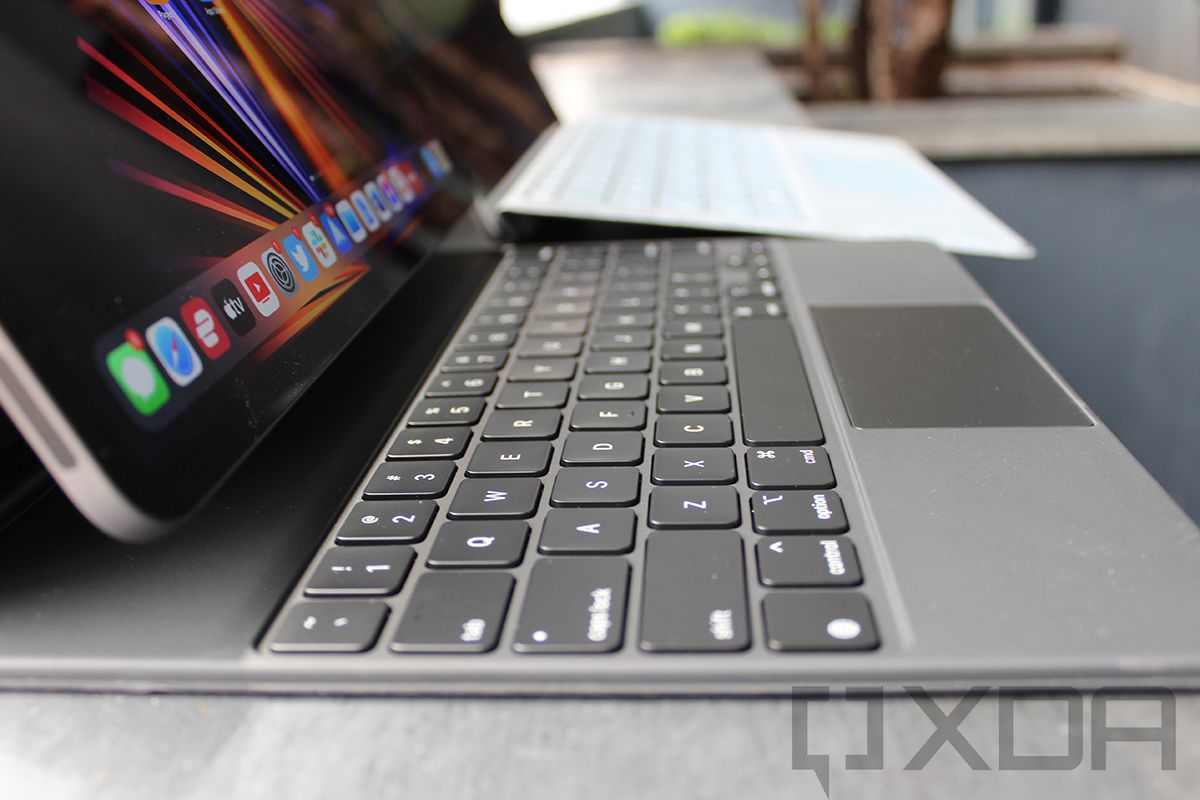
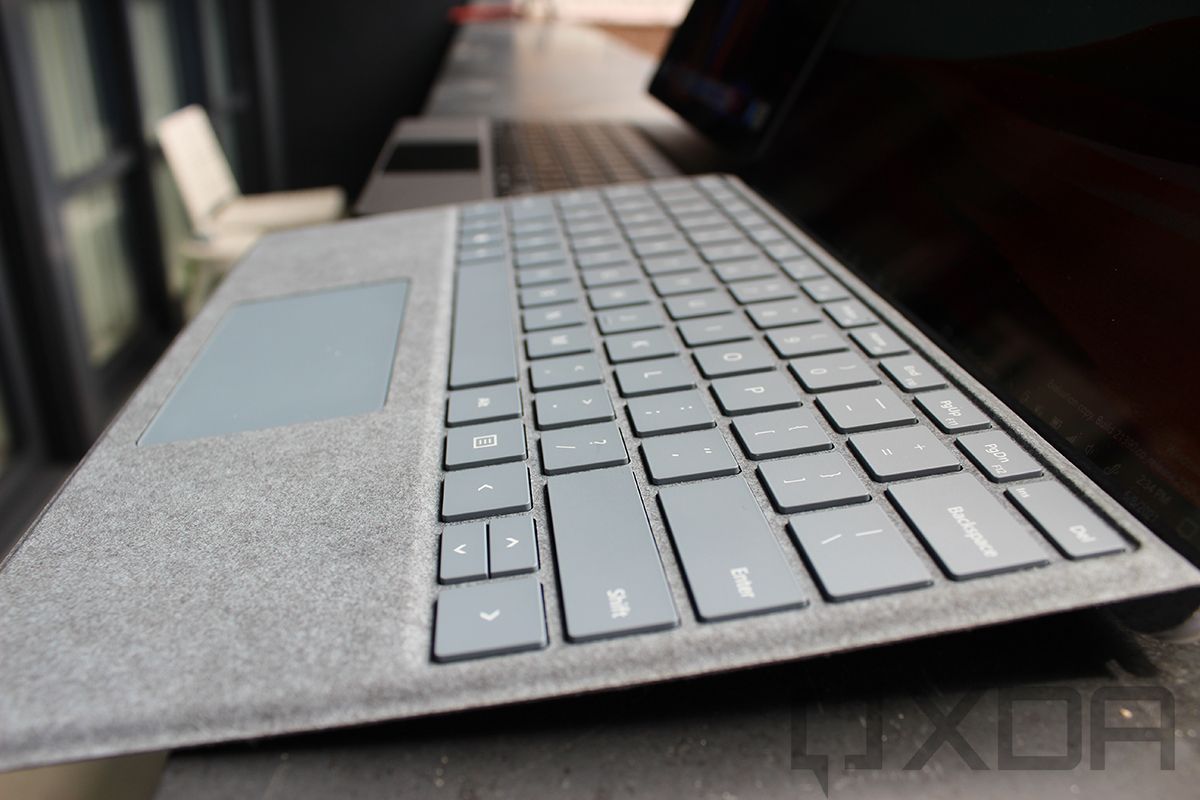
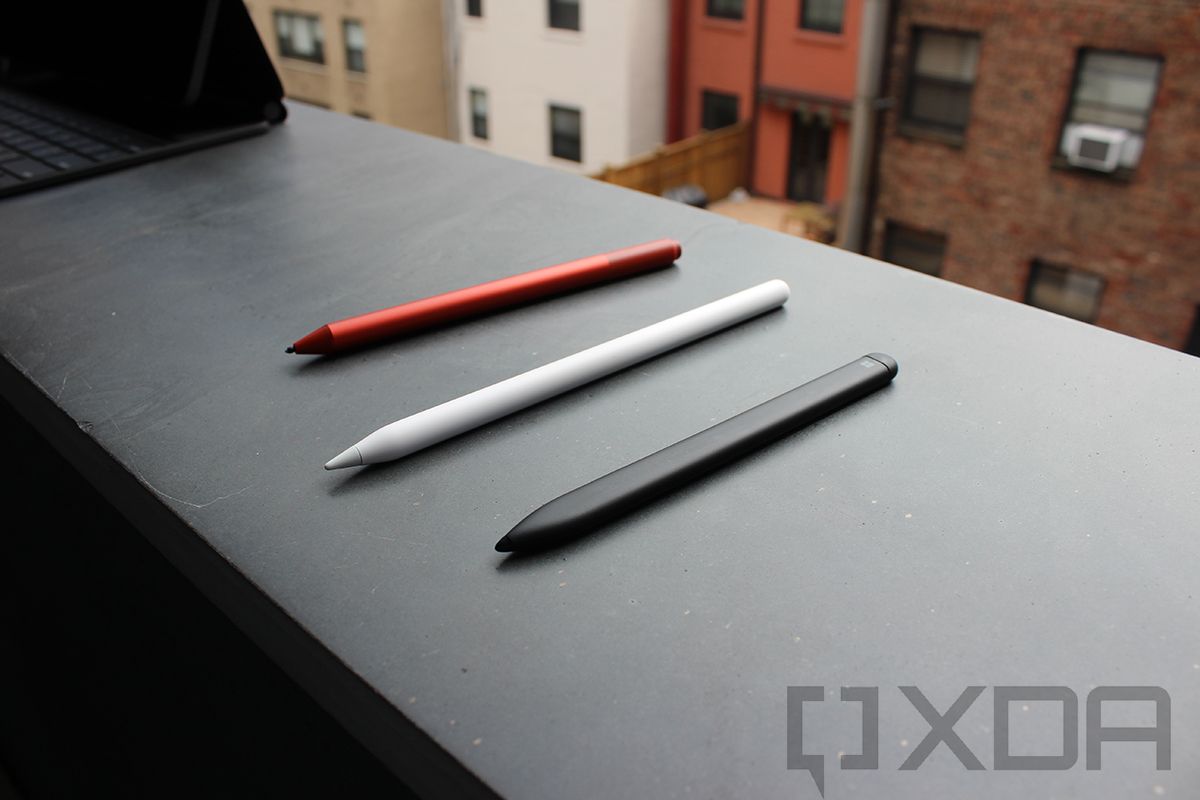
Side view of iPad Pro keyboard Side view of Surface Pro X keyboard Surface Pen, Apple Pencil, and Slim Pen

The Surface Pro X and the iPad Pro have their own respective keyboards and stylus. Sadly they don’t come bundled with either of them, which means you need to spend extra money for a keyboard and stylus if you’re planning to buy the new iPad Pro or Surface Pro X. You can either go for the Apple Smart Keyboard Folio for the 12.9-inch iPad Pro that costs $199, or if you’re looking for a proper laptop experience, you need to invest in the Magic Keyboard, which costs $349. The iPad Pro also supports the 2nd-gen Apple Pencil, which is available for $129.

The Magic Keyboard for the iPad Pro gained a lot of attention during its launch last year with its floating screen design. It looks really cool, allowing you to snap the iPad using strong magnets inside the upper portion of the keyboard case. But there are limitations. First and foremost, the display angle is limited compared to what you get on the Surface Pro X, thanks to its kickstand. On top of that, the entire weight of the tablet rests on the top half of the keyboard, which makes the entire setup a bit wobbly, especially if you don’t have a flat desk.

The Apple Pencil is currently the most versatile stylus you can have on a tablet. It goes beyond doodling and scribbling notes by letting you convert handwriting into text almost anywhere on UI using Scribble, switching between tools by double-tapping, various gestures, wireless charging, tilt and pressure support, and a lot more.

The standard Surface Pro X Keyboard is priced at $140 and is very similar to the Surface Pro Type cover for the Surface Pro 6/7, having a slim profile, backlit keys, and magnets that help you easily snap onto the tablet. If you can spend a little extra, the Surface Pro X Signature keyboard offers a black Alcantara fabric and a pen garage for you to stow the stylus.

Microsoft redesigned the stylus for the Surface Pro X, which is now smaller and has a flat design. The $145 Surface Slim Pen can also charge wirelessly using its own charging cradle or when you store it in the Surface Pro X Signature keyboard. The features for the stylus are pretty similar to what you can expect from most of the options out there available on Windows; however, the next Windows 11 update is expected to bring some new, well-needed upgrades.

The typing experience shouldn’t be an issue on either of the keyboards, and you should quickly adapt to the layout. Having said that, the keyboard for the Surface Pro X is not only cheaper but easier to handle as well. The Magic Keyboard is undoubtedly unique and offers an additional USB-C port, but function matters over form at the end of the day. I also recommend checking out the Logitech Combo Touch keyboard case, which is comparatively cheaper than Apple’s Magic Keyboard, and completely transforms the iPad Pro into a Surface-like device.

When it comes to pen support, the Apple Pencil is a clear winner as it offers a wide range of features, but note there’s no dedicated cradle, like the Surface Slim Pen, unless you invest in a third-party case.

Performance: The M1 Silicon is superior to the Microsoft SQ2

The Surface Pro X is one of the only Microsoft products that’s powered by an ARM processor. The company partnered with Qualcomm to build custom SoCs (system on chip) called the SQ1 and SQ2, which are basically the same as the 1st-gen and 2nd-gen Qualcomm Snapdragon 8cx chipsets. You can check out some of the best native apps for Windows on ARM.

The SQ2 chip model was announced last year and comes with the big-little architecture, having four CPU cores clocked at 3.15GHz, while the other four are clocked at 2.42GHz. You can configure it with 16GB of RAM and up to 512GB SSD, which is user-replaceable.

The new iPad Pro runs on Apple’s M1 chipset, which is also based on the ARM architecture; however, there are no limitations regarding app support. As mentioned before, this is the same chip Apple now uses to power the MacBook Pro 13, the MacBook Air, Mac mini, and the new 24-inch iMac. It’s based on the 5nm node featuring an octa-core CPU, an octa-core GPU, and a 16-core neural engine. In terms of memory and storage, the iPad Pro is available with 8GB of RAM on models with 128GB, 256GB, or 512GB of storage, and 16GB RAM on models with 1TB or 2TB storage.

In our comparison of the iPad Pro with the Surface Pro 7, I mentioned the iPad Pro hardware is far superior. At the same time, it’s unfair to compare the performance as both tablets run on different operating systems. Similarly, the Surface Pro X also runs on Windows, and once again it isn’t very straightforward if we were to compare the performance. Of course, benchmark test numbers suggest that the iPad Pro wins by a good margin.

Bottom line

I would reiterate my conclusion from the iPad Pro and Surface Pro 7 comparison. If you’re planning to buy either of these, make sure you think about your core needs. The iPad is a great tablet but not a perfect replacement for a laptop. It has wide app support on a mobile-like ecosystem, offers better cameras, the option of 5G connectivity, and possibly the best pen input you can get. However, the Surface Pro X is better tuned for a laptop experience as it runs on Windows, even though it offers limited support for apps. You’ll feel more familiar while carrying out day-to-day tasks like web browsing, checking emails, editing photos, and so on.

Also, before you make up your mind, check out our roundup of the best Surface PCs from Microsoft and the best iPads on the market.

    Apple iPad Pro 12.9-inch
    The 2021 12.9-inch iPad Pro is powered by Apple's M1 ARM chipset and an all-new Liquid Retina XDR mini-LED display. It can be configured with up to 2TB of storage, 5G connectivity and offers Thunderbolt support.
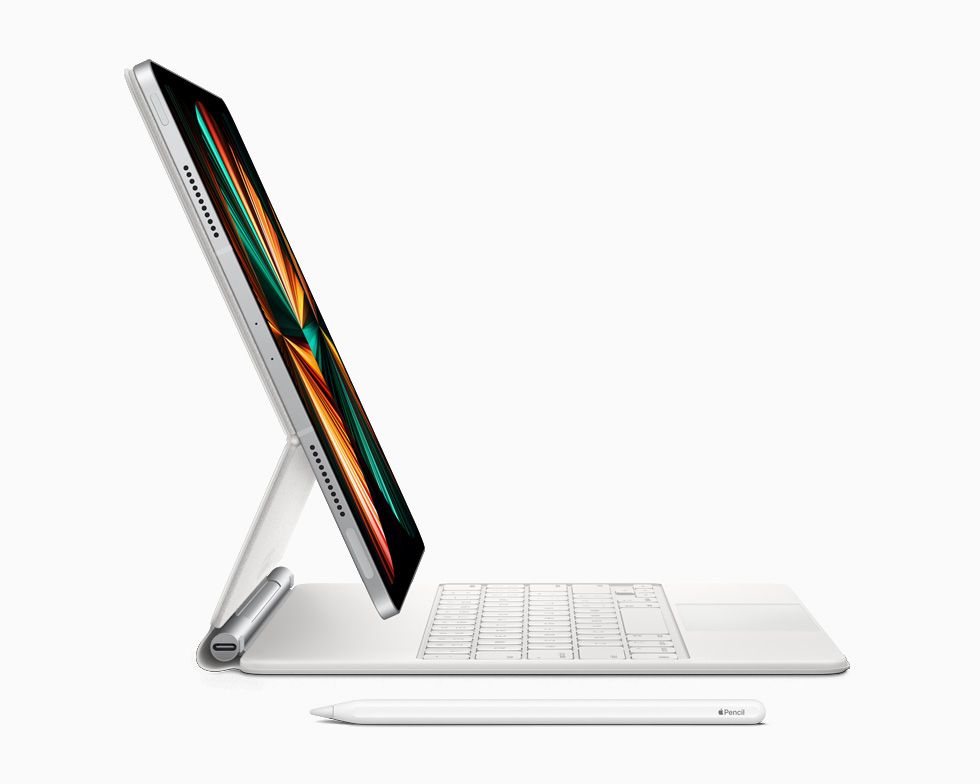
    Magic Keyboard for iPad Pro 12.9
    The Magic Keyboard for the iPad Pro comes with a floating-screen design, backlit keys and an additional USB-C port.
    Microsoft Surface Pro X
    The Surface Pro X is Microsoft's ARM-based Windows hybrid tablet that's powered by a custom version of the Qualcomm Snapdragon 8cx.
    Surface Pro X Signature Keyboard with Slim Pen
    The Surface Pro X Signature keyboard bundle comes with the Surface Slim Pen and a dedicated cradle to store the stylus.
    Surface Slim Pen
    The Surface Slim Pen is specifically designed for the Surface Pro X as it can be easily stored in the Surface Pro X Signature Keyboard cover, although it offers support for the entire Surface lineup of products.

The post Apple iPad Pro 12.9-inch (M1) vs Microsoft Surface Pro X: Battle of the best ARM tablet appeared first on xda-developers.


from xda-developers https://ift.tt/3zP2Pcw
via IFTTT

Microsoft Edge 92 for Android rolling out with the unified codebase

Following the release of Microsoft Edge 92 for PCs, Microsoft is now giving the same treatment to its mobile browser. This is a major update for Microsoft Edge for Android as it finally unifies the codebase with the PC version. Up until now, the stable version of Microsoft Edge for Android was stuck on Chromium 77. As you would expect, it lagged behind other Chromium browsers in terms of both features and performance. But that changes with Microsoft Edge 92, which, as the name implies, is based on Chromium 92.

With the unification of the codebase (via Techdows), we can expect the mobile browser to receive new features and improvements at a much faster pace. Microsoft Edge 92 is packed with many new features. It now lets you synchronize tabs, passwords, history, bookmarks, favorites, and more across devices when you’re signed in using the same Microsoft account. There’s also a built-in ad blocker powered by Adblock Plus, allowing you to block trackers and annoying ads on all websites. You can find the ad blocker under Settings > Privacy and Security > Block ads. It also gives you the option to allow non-intrusive ads that comply with the Acceptable Ads criteria.

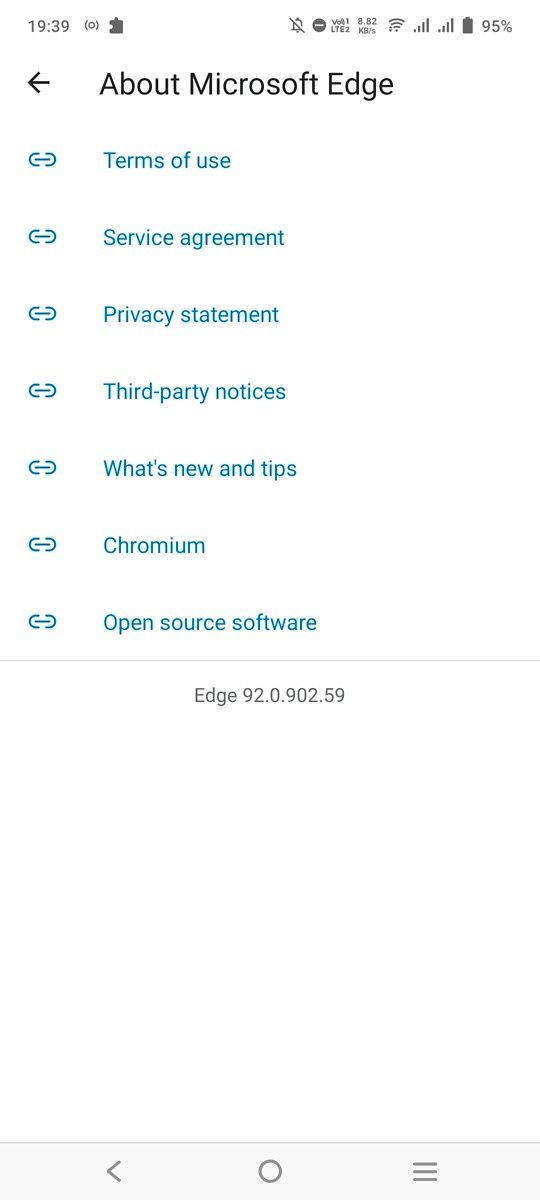
Home screen of Microsoft Edge for Android Microsoft Edge for Android settings page Screenshot button in Microsoft Edge Ad blocker feature in Microsoft Edge for Android Microsoft Edge for Android about page

Similar to Google Chrome, Edge for Android now offers a built-in screenshot tool. When you’re on a webpage, tap on the Share menu, and you should see the screenshot button in the bottom right corner in the sharesheet menu (see the third screenshot above). Elsewhere, the new update revamps the Settings page, lets you send webpages to other devices signed with the same Microsoft account, and adds a page translation feature powered by Microsoft Translator.

The new version has started rolling out on the Google Play Store, but it seems to be a staged rollout as the Play Store listing on my device is still showing the old version. You can hit the Play Store link below to see if it’s available for you. Alternatively, you can grab the latest APK straight from APKMirror.

Microsoft Edge: Web Browser (Free, Google Play) →

The post Microsoft Edge 92 for Android rolling out with the unified codebase appeared first on xda-developers.


from xda-developers https://ift.tt/3rGuoSC
via IFTTT

Where is the best place to buy the HP Chromebook 14?

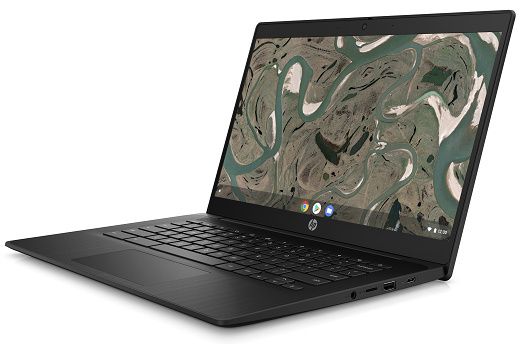
If you’re looking for a new Chromebook, there’s a good chance at least one model of HP’s Chromebook 14 is on your list. The Chromebook 14 lineup from HP spans nearly 20 different models, with a range of configurable options and price points. With so many choices, it’s easy to find something that fits your personal description of the ideal Chromebook.

In this guide, we take a look at the top 3 models of the HP Chromebook 14 at the three largest online retailers — HP, Amazon, and Best Buy. To make your purchasing decision easier, we discuss pricing, return policy, and support at each vendor.

Pricing

In general, Amazon tends to have the lowest price on average across most HP Chromebook 14 models. On the other hand, Best Buy runs seasonal sales that often make the big-box giant an appealing option. Around back-to-school time and Christmas, you can find some of the HP Chromebook 14 models for a great price at Best Buy. Keep in mind Best Buy will also price match Amazon, so if you prefer buying locally you can take advantage of this to get the best price.

Of the three options, HP typically doesn’t have the best pricing for general consumers. You might get an occasional discount, but the pricing at HP is typically a bit higher than both Amazon and Best Buy.

However, if you’re a student or teacher, you can take advantage of HP’s education discount program. With the education discount, you can save up to 20% on models of the HP Chromebook 14. This could be the best available deal for a particular device. Be sure to check all three websites to get the best overall price.

Return/exchange policy

Return policy is perhaps the biggest factor to consider when purchasing your new HP Chromebook 14.  Checking out HP’s website, you’ll find they have a 30 day return window with a restocking fee up to 15%. In practice, you can expect to pay the full 15% restock fee on most Chromebook 14 models. This is a fairly big downside to buying directly from HP.

HP.com official return policy

Best Buy has a shorter 15 day return window for Chromebooks, but they don’t have a restocking fee. In addition, if you shop with Best Buy often, you may qualify for Elite or Elite Plus status, expanding your return window to 30 or 45 days respectively.

Best Buy's official return policy

I personally choose to shop at Best Buy for most tech purchases to take advantage of my extended 45 day return window. No restocking fee with 45 days to try out a new device is a great bonus. Plus, it’s nice to have a physical store I can visit for returns or exchanges without waiting to mail the device back.

If you buy from Amazon, you can expect a 30 day return window. Keep in mind you need to buy directly from Amazon.com and not a third-party seller. Amazon doesn’t have a restocking fee. Overall, Amazon has the best return policy if you aren’t a Best Buy Elite or Elite Plus member.

Support

When it comes to support, you would think buying directly from the manufacturer is the best option. While it’s easier to get direct support through the manufacturer warranty if you buy from HP, there are additional support options available at Best Buy and Amazon.

If you purchase from Best Buy, you can add a Geek Squad plan to your purchase and get local support for the life of your Chromebook 14. Amazon also offers their own 2 and 3 year protection plans for a very reasonable cost. In terms of value, the Amazon plan is a better deal if you’re willing to send in your machine to get repaired. Best Buy is a superior option for local service, but you pay quite a bit more for this support.

That’s our comparison of the purchasing options for the HP Chromebook 14 at HP, Amazon, and Best Buy. All three retailers carry numerous models of the Chromebook 14, so you can certainly find many touchscreen options and traditional clamshells as well. Let us know which model of the HP Chromebook 14 you plan to grab.

    HP Chromebook 14
    You can buy all of the latest Chromebook 14 models directly from HP's website.
    HP Chromebook 14
    Amazon is a great option if you have a Prime account. You can also find pre-owned models on Amazon to save a few bucks.
    HP Chromebook 14
    If you want a local store, Best Buy is the best option for your HP Chromebook 14 purchase. The store also has a competitive return policy with no restocking fee.

The post Where is the best place to buy the HP Chromebook 14? appeared first on xda-developers.


from xda-developers https://ift.tt/3xeKkg7
via IFTTT

Does the HP Chromebook 14 have a built-in webcam? Is it any good?

The HP Chromebook 14 is one of the most popular consumer Chromebook models out there. In fact, HP has a number of different variations of the Chromebook 14. If you recently picked up a new or pre-owned HP Chromebook 14, you might be wondering about the webcam. Webcam usage skyrocketed during the Covid-19 pandemic.

Even today, millions more people are working remotely from home on Zoom or Microsoft Teams. The good news is all models of the Chromebook 14 lineup come equipped with a webcam. There are some variations in quality depending on when your HP Chromebook 14 was manufactured. Let’s take a look at the differences.

HP Chromebook 14 models released before 2020

If your Chromebook 14 model was released before 2020, your webcam is either 480p or 720p. The disappointing 480p webcam appeared on the earliest models of the Chromebook 14, so you likely don’t have this webcam if you’re still using the Chromebook in 2021.

While 720p is a step up, it’s still not ideal for video calls. Most modern phones and many tablets have 1080p webcams, while laptops continue to lag behind. You should be able to get by with your 720p webcam on older models, but you may want to consider upgrading to a newer Chromebook when 1080p webcams become more ubiquitous.

HP Chromebook 14 models released from 2020 on

Models of the HP Chromebook 14 released from 2020 onward all have 720p webcam with an optional privacy shutter and wide vision enhancements. The privacy shutter is a nice feature if you’re worried about anyone hacking your webcam or spying from government agencies. If your Chromebook 14 has the Wide Vision enhancement, then it has a wider field of view. This is also a useful feature if you need to give a presentation using your Chromebook.

If you’re interested in the full list of Chromebook 14 models and the corresponding webcam specs, check out the comprehensive table below. For those of you still searching for a new Chromebook, check out our list of the best HP Chromebooks and the best touchscreen Chromebooks overall.

    HP Chromebook 14
    You can buy all of the latest Chromebook 14 models directly from HP's website.
Product Webcam quality/features
Chromebook 14 480p
Chromebook 14 G3 480p (base model) 720p (all other models)
Chromebook 14 G4 720p
Chromebook 14 G5 720p
Chromebook 14 G6 720p (optional privacy shutter)
Chromebook 14 G7 720p (optional privacy shutter)
Chromebook 14a 720p
Chromebook 14a-na1 720p (optional privacy shutter)
Chromebook 14A G5 720p
Chromebook Enterprise 14A G5 720p (optional privacy shutter)
Chromebook 14-ca0xx 720p (optional privacy shutter)
Chromebook 14-ca1xx 720p (optional privacy shutter)
Chromebook 14-da0xxx 720p
Chromebook 14-db0xxx 720p


The post Does the HP Chromebook 14 have a built-in webcam? Is it any good? appeared first on xda-developers.


from xda-developers https://ift.tt/3iXLrvq
via IFTTT

Qualcomm has a new partner to build its chips: Intel [Update: Maybe not]

Next year, Qualcomm is set to introduce a new custom ARM architecture that’s going to compete with Intel’s processors. But a couple of years later than that, Intel might be building Qualcomm’s chips. Today, Intel laid out its roadmap through 2025, renaming its process nodes and showing what each generation will look like. One of those, called Intel 20A, is something that Qualcomm is going to make use of.

Intel 20A is promised to be revolutionary. The firm says that it will bring us into the angstrom era, so process nodes are going to be measured in angstroms, rather than nanometers (an angstrom is a tenth of a nanometer). It’s going to be about 20 angstroms at first, so these are going to be smaller process nodes than we’ve ever seen before, and it should arrive in 2024. Intel 20A also promises an all-new transistor architecture, using the new RibbonFet technology, along with the new PowerVia backside power delivery network.

The move might seem surprising, given that Qualcomm and Intel are such staunch competitors. Indeed, it appears that in many areas, Qualcomm is either winning or gaining ground. Intel attempted to make mobile chips and failed, and later, it had to give up its attempts at making 5G modems for smartphones. In the PC space, Windows on ARM hasn’t really taken off, but with Qualcomm’s acquisition of NUVIA, it has big things planned.

However, it’s not as surprising as you’d think. Rivals partner with each other all the time, even if the divisions partnering aren’t necessarily competitors. In the heated days of Apple iPhone vs Samsung Galaxy, Samsung used to manufacture Apple’s custom ARM processors. We’ve seen Qualcomm partner with Samsung on its Snapdragon chips in recent years, so partnering with Intel is logical if Intel indeed has the better technology.

And one of the key things that new Intel CEO Pat Gelsinger set out to do was to build out the firm’s foundry business. Indeed, this is a deal that works out for everyone involved.

Other than that Qualcomm will be using Intel 20A, there really weren’t any other details provided. Obviously, we’ll find out more between now and 2024.

It would seem that at best, Intel’s boasts about Qualcomm as a foundry customer are premature. Qualcomm’s President and CEO Cristiano Amon was asked about the deal and said the following, according to SemiAnalysis:

Thanks for the question. Look, it’s actually very simple. Qualcomm, we’re probably one of the few companies that, given our scale, is able to have multi-sourcing at the leading node. We have two strategic partners today, which is TSMC and Samsung.

And we’re very excited and happy about Intel deciding to become a foundry and investing in leading node technology to become a foundry. I think that’s great news for the United States fabless industry. We are engaged. We are evaluating their technology.

We don’t yet have a specific product plan at this point, but we’re pretty excited about Intel entering the space. I think we all determined that semiconductors are important and resilient supply chain is only going to benefit our business.

So, as for whether or not Intel will actually be building Qualcomm chips on the 20A node in 2025, the answer is maybe. And if it does happen, it’s not something that’s set in silicon right now.

That’s not entirely surprising either. Intel’s 10nm nodes were supposed to ship years before they actually did, getting delayed time and time again. It’s 7nm process is already delayed as well. If Qualcomm had actually tied itself to Intel’s promise of a 2nm (or 20 angstrom) node in 2025, that would be more surprising.

The post Qualcomm has a new partner to build its chips: Intel [Update: Maybe not] appeared first on xda-developers.


from xda-developers https://ift.tt/3y6XyMR
via IFTTT

Facebook thinks you’ll buy its smart glasses if it has Ray-Ban branding

In March this year, Facebook showcased new wristband controllers for future AR systems. The wristband controllers aimed to provide a more natural and intuitive method to control the company’s upcoming AR glasses. While Facebook didn’t share any details about the AR glasses at the time, Mark Zuckerberg has now confirmed some details.

During an earnings call this week, Zuckerberg said, “Looking ahead here, the next product release will be the launch of our first smart glasses from Ray-Ban in partnership with EssilorLuxottica. The glasses have their iconic form factor, and they let you do some pretty neat things. So I’m excited to get these in people’s hands and to continue to make progress on the journey towards full augmented reality glasses in the future.”

Although Zuckerberg didn’t reveal any info about the “neat things” the upcoming glasses would be capable of, Facebook has previously confirmed that the glasses won’t feature an integrated display, and they won’t be classified as an AR device (via The Verge). This leads us to believe that Facebook’s upcoming Ray-Ban branded smart glasses would rely on a companion app, like the original Snap Spectacles, the Razer Anzu, and the Amazon Echo Frames.

The Ray-Ban partnership will, most likely, help Facebook’s upcoming smart glasses stand apart. Although a lot of us won’t go out and buy the glasses just because of the Ray-Ban branding, many people will. And Facebook is banking on that. This is why, instead of revealing any technical details about the upcoming smart glasses, Zuckerberg shared info about the Ray-Ban partnership during the earnings call.

What’s your take on Facebook’s decision to partner with Ray-Ban for its upcoming smart glasses? Do you think the Ray-Ban branding will help the glasses achieve mainstream success? Let us know in the comments below.

The post Facebook thinks you’ll buy its smart glasses if it has Ray-Ban branding appeared first on xda-developers.


from xda-developers https://ift.tt/2V3lQJA
via IFTTT

AMD’s Radeon RX 6600 XT is made for 1080p gaming and costs $379

AMD has added a new member to its Radeon RX 6000 series of graphics cards targetting gamers looking for a capable 1080p GPU. The new RX 6600 XT sits below the RX 6700 XT, making it the fifth card in the series based on the RDNA2 architecture. The latest GPU comes with 8GB of GDDR6 memory, 32 Compute Units, and a peak single precision compute performance of 10.6 teraflops.

We were expecting AMD to launch a mainstream 1080p desktop GPU soon, especially after the launch of the Radeon 6000M series mobile gaming chipsets, which include the Radeon RX 6800M, RX 6700M, and the RX 6600M. Notably, AMD’s card comes a good five months after NVIDIA’s GeForce RTX 3060, giving Team Red an advantage in understanding and positioning its new card for the right set of audiences. As per AMD, the RX 6600 XT is the best GPU for 1080p gaming and can beat the RTX 3060.

AMD also emphasized the importance of a 1080p card, suggesting that about two-third of monitors shipped around the world are still 1080p. Having a 2359 MHz game clock speed and 160W rated power consumption, the card uses a single 8-pin PCIe power connector. The new RX 6600 XT graphics card offers up to 15 percent higher performance on average with max settings across select AAA titles compared to the competition and 125 FPS on average across a range of modern AAA titles.

AMD Radeon RX 6600 XT specs

With a starting price of $379, the Radeon RX 6600 XT seems like a promising GPU for gamers looking at a fairly inexpensive option for 1080p gaming. It will go on sale starting August 11th, with board partners including ASRock, ASUS, BIOSTAR, Gigabyte, MSI, PowerColor, SAPPHIRE, XFX, and Yeston expected to launch their products on the same date. Pre-built systems and system integrators are also expected to offer the GPU beginning August 2021.

ASUS Radeon RX 6600 XT GPU models

ASUS is one of the first board partners that has already announced two models based on the  Radeon RX 6600 XT. The ROG Strix and ASUS Dual AMD Radeon RX 6600 XT graphics cards will be available at the above-mentioned date. The ROG Strix will be the more lucrative option featuring RGB lighting, four heat pipes for cooling, and the option to optimize performance with two different fan and power profiles, using the onboard dual-BIOS switch.

For more details, check out AMD’s product page here.

The post AMD’s Radeon RX 6600 XT is made for 1080p gaming and costs $379 appeared first on xda-developers.


from xda-developers https://ift.tt/378MEKN
via IFTTT